

very interesting transition night day

wolltywollty Member Posts: 102
hello to all the community
i see very interesting day night transition effect
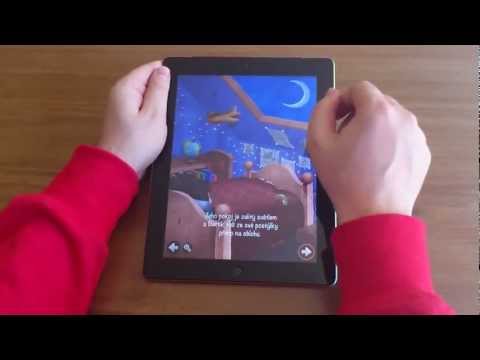
Check 2'40 "-2'59"

I'd like to reproduce an effect of this kind
but how did they do?
many actors have put it?
1 actor sky day?
1 actor sky night?
1 actor bar in the middle?

I note that both the day and night sky are still
are not dragged

I can not understand how they organized this effect
If I understood maybe I could reproduce it (at least I'd try)

thanks for your attention

Comments

  • wolltywollty Member Posts: 102
    do I forgot to put the link to the free version of this book
    if downloaded you can try the effect
    https://itunes.apple.com/us/app/who-stole-moon-free-version/id482612887?mt=8

    thanks to all
  • The_Gamesalad_GuruThe_Gamesalad_Guru Member Posts: 9,922
    Hmmm not sure if an effect that smooth is possible in GS. They may have used a mask of some kind which we can't do in GS. This was probably done with a more powerful coding environment.
  • wolltywollty Member Posts: 102
    I thought you something
    type an animation with masks of adobe flash
    thanks
    sorry for my english
  • HopscotchHopscotch Member, PRO Posts: 2,782
    edited June 2013
    Quite easy actually.

    Make the lefthand actor full size. Then manipulate the width and position of the righthand actor according to the mouse position.

    The trick is in the Actor:Graphics:Horizontal Anchor - set this to "right".

    Maybe an ability to change the x and y offset of an image inside an actor (at run time) would allow for even more creative effects.
  • HopscotchHopscotch Member, PRO Posts: 2,782
    Here is a rough project to illustrate.
  • wolltywollty Member Posts: 102
    thanks Hopscotch

    I do not understand
    What is rought project?
    I can not open it with GameSalad

    thank you very much for your attention and help
  • Braydon_SFXBraydon_SFX Member, Sous Chef, Bowlboy Sidekick Posts: 9,273
    Hi @Hopscotch - You used the nightly build application to build that. It won't open the project for those who don't have access to the nightly builds... Just FYI ;)
  • HopscotchHopscotch Member, PRO Posts: 2,782
    Just unzip the file. Or are you using the Windows version of creator?
  • wolltywollty Member Posts: 102
    no
    i using mac
    but when i unzipped the file there is a folder with multiple files but not files with extension .gameproj
  • Braydon_SFXBraydon_SFX Member, Sous Chef, Bowlboy Sidekick Posts: 9,273
    ...
    Hi @Hopscotch - You used the nightly build application to build that. It won't open the project for those who don't have access to the nightly builds... Just FYI ;)
  • wolltywollty Member Posts: 102
    what is nightly build?
  • Braydon_SFXBraydon_SFX Member, Sous Chef, Bowlboy Sidekick Posts: 9,273
    The Nightly Builds are GameSalad's pre beta...beta release. So the PRO's, Line cooks and Sous Chefs get the new features a bit before the regular users. We play around with the build and make sure all of the bugs are cleaned up prior to GameSalad releasing to the public.
  • HopscotchHopscotch Member, PRO Posts: 2,782
    :\">

    Here it is in the proper version, just unzip.
  • wolltywollty Member Posts: 102
    I just bought gamesald pro
    how can I do now to open this zip

    thanks
  • HopscotchHopscotch Member, PRO Posts: 2,782
    @Wollty, if you have downloaded and saved the file to disk, then right click on the file and choose "Open With : Archive Utility". Then you should have the project file to open in GS.
  • The_Gamesalad_GuruThe_Gamesalad_Guru Member Posts: 9,922
    Ah yes, didn't consider you could fasten the anchor point..Hmm...Will have to play with that. It doesn't strech the image?
  • HopscotchHopscotch Member, PRO Posts: 2,782
    @FBS, under "Actor : Graphics : Horizontal Wrap" you can specify "Fixed"
  • wolltywollty Member Posts: 102
    thanks
    but I can not open the file
    what is the right file?
    https://www.dropbox.com/s/3dmbafe6wdt7ett/Schermata 06-2456458 alle 16.42.28.png

    sorry
  • HopscotchHopscotch Member, PRO Posts: 2,782
    @wollty, please download the second file that I uploaded. That is the correct one for your version.
  • wolltywollty Member Posts: 102
    bravo =D>
    now i look good
    to understand how you did it
    :)

    @Hopscotch you're really good

    thanks very much
  • HopscotchHopscotch Member, PRO Posts: 2,782
    Super, good luck and show us what you did when you are done.
  • wolltywollty Member Posts: 102
    today i are a little shameless
    I ask one more thing ....

    ipad landscape (check resolution indipendence)

    images day and night appear twice as large in the x

    What could I do?

    thanks
Sign In or Register to comment.